



An item should enable a new useful action or improve one already available. I want the knowledge base to help name that action before buying: save an ally, survive focus, reach a target or solve a resource shortage.

Why this item right now?
Explanation text
OOPS DOTA. Before buying, ask one question: what will this item let me do right now? Survive, save an ally, catch an enemy or start a fight? Your build changes with your task and your opponents. Six expensive icons don’t make a good plan. Rodya thinks first and opens the shop second.
Start with what prevents you playing
If a purchase starts with an attractive picture of a final build, it is easy to spend gold on someone else's task. Name your match's problem. Not enough mana for two casts? Cannot escape danger? An ally gets caught first? Need to stop an enemy before their attacks?
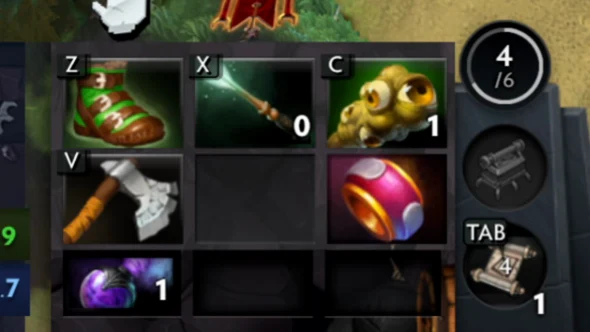
On an item page, I gather its image, effects and explanations for choosing it. The icon helps you recognise it in the shop and inventory, but description and context drive the decision. The same slot in different matches can be an early necessity, late insurance or an unnecessary purchase.
- Which specific problem keeps happening?
- What action will this item enable?
- Will I be able to use it at the right moment?
- What must I give up to pay for it?
‘Before buying, I want to understand both what to get and which problem it will solve in the next fight.’
Ruslan Ukrainskyi · OOPS DOTA

Distinguish a passive effect from an active button
Not every useful item needs activation. Some provide stats and constant effects, some trigger under a condition, and others need you to use them. Find the cast target, restrictions, cooldown and interaction with a dangerous effect in the description.
Glimmer Cape, Force Staff and Aeon Disk serve different defensive purposes. Invisibility does not negate detection. Movement needs to account for position and direction. A safety effect triggering has its own limits and downtime. The word ‘save’ does not make these items interchangeable.
 EXPLORE THE EXAMPLE ↗
The actual inventory panel from my match. The space and the item occupying it are two different uses of the word ‘slot’.
OOPS DOTA / Ruslan Ukrainskyi · own Juggernaut recording
Purchase timing depends on an event, not one minute
An average minute from someone else's sample is useful as a guide, not an order. Your lane, income and the team's next task differ. It is better to connect a purchase with an event: before an important fight, before entering dangerous ground or after a specific threat appears.
If I get caught before the first cast, I may need a defensive item before more damage. If the team is already ready to act, long farming for an expensive item can leave it without help. Compare both future strength and what you can do with the gold available now.
A personal example: my Witch Doctor
On Witch Doctor, my usual order is boots, Glimmer Cape, Aghanim’s Scepter, Shard, then Aeon Disk. Afterwards, I may consider BKB or Aether Lens depending on the match. This is a personal preference I share, not a mandatory sequence for every player.
The example shows my priorities and gives reasons to ask questions. Can I cast a useful Death Ward? How do enemies find and interrupt me? Do I need protection earlier? Do I have enough range? If the answers change, purchase order can change too. See detailed effects on the hero's and items' pages.
A patch changes the conditions for your choice
Price, stats, effects, hero upgrades or interactions can change. That makes the source and check date important on a page. You cannot automatically carry an old build into a new match just because the item name is familiar.
In the patch archive, I highlight changes and explain the questions they raise. For example, a cheaper item arrives sooner but does not become useful against every hero. Reduced damage requires recalculation but does not erase other effects. The source provides the fact; the decision still depends on the game.
After a patch, we recheck changed effects, costs and item components, as well as affected recommendations. We update the source and check date separately; the whole database does not refresh automatically. If a page still reflects the previous version, compare it with current Valve notes and the current client first.
Check the purchase after the match
In a replay, choose one fight after buying. Did you activate the item in time? Did it solve the named problem? If not, the cause may be the item choice, a late purchase, positioning or the activation itself. These mistakes need different fixes.
I suggest a short note: ‘Bought X to do Y; got Z’. Even after a lost match, that note can reveal a useful decision. If the item remained a pretty icon until the end, it is a good candidate for your next review.
- Find the moment you bought the item for.
- Separate the purchase choice from the quality of its use.
- Keep one adjustment for the next match.
You are saving for an expensive Aghanim, but keep dying before a useful cast. What should you check first?
Choose an action and read the explanation.
Sources and context
This is my approach to reviewing decisions. I check game data against the current patch and distinguish practice scenarios from events in my own match.
OOPS DOTA item atlas ↗Valve: current item definitions ↗Change archive and Ruslan's explanations ↗Witch Doctor: abilities and purchases ↗