


One topic. One exercise.
Learn the match objective, controls and safe practice before your first game against people. I suggest understanding an action first, trying it in safe practice, then choosing one adjustment for your next game.
The team that reaches the Ancient wins
Each team has a base and a main building: the Ancient, also called the throne. Kills give you time and resources, but do not end the match by themselves. Lanes, towers and other buildings stand between the heroes and the throne.
Find your base, the three lanes and the river on the minimap. Ally markers help you see where your team is. A dark area is somewhere you may currently have no information about.
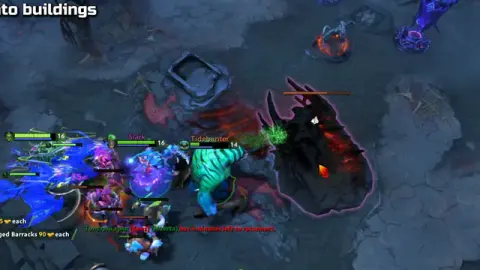 EXPLORE THE EXAMPLE ↗
In my match, the team takes buildings after a fight. A successful push ends with the enemy losing an objective.
OOPS DOTA / Ruslan Ukrainskyi
Try the buttons first
Open the in-client tutorial or Demo Hero mode. Pick one hero and try moving, attacking, casting an ability and using an item. Hover over each button and read its description.
Find the bindings for stop, hold position, attack, shop, courier and teleport. Layouts vary: understanding the action matters more than memorizing someone else’s key.
The goal of your first practice
In a bot match, practice one sequence: reach the lane, last hit a few creeps, buy an item, receive it from the courier and return to your team. Do not try to learn the whole shop at once.
After the game, pick one moment you did not understand. “Why could I not cast that ability?” is more useful than “Why am I bad?” Look up unfamiliar words in the glossary.
Set up comfortable controls, not someone else’s layout
In settings, check attack, stop, ability and item commands. If an action is hard to find, practice it in a safe mode. Do not change your whole layout before your first game: start with what the exercise already needs.
Connecting a button to its result matters more than speed. After a command, watch what your hero does: moves, stops, starts attacking or selects a target. If the result is not what you expected, repeat that action separately instead of mixing it into a new fight.
«I begin first-game practice with the controls, not a demand to do everything quickly straight away.»
Ruslan Ukrainskyi · OOPS DOTA
- 01I choose one hero
- 02I try the controls
- 03I receive my purchase
- 04I repeat without a prompt
Try it in the client.
Open the tutorial or a bot match. Pick one familiar hero and keep that hero throughout this practice.
- 01
Find your base, the three lanes and the river on the minimap.
- 02
Walk to a lane, stop your hero, make a normal attack and cast one ability.
- 03
Buy a simple item, find it on the courier and receive the delivery.
- 04
Name the enemy’s main building that your team is advancing toward.
How to tell whether it worked
You can repeat move → stop → attack → cast → receive item without a prompt. We are not judging speed yet.
You can move and cast an ability, but do not know how to receive a purchase. What should you do before your first game against people?
Choose an action and read the explanation.
Tried it in-game?
Mark the lesson when you’ve done the practice. It’s your checkmark, not a skill grade.
Next lesson ↗Sources and context
An original beginner course by Ruslan Ukrainskyi. The learning path was prepared on October 6, 2026 for patch 7.41f; check exact values, object locations and interactions against the current client and Valve’s source. Illustrations have separate captions: our own recordings, official demonstrations and clearly marked historical examples.
Valve: short practice scenarios and a glossary (2021) ↗Valve: heroes and ability descriptions ↗Valve: current patch 7.41f notes ↗